Overview
AI in GIRI: what happens to my data?
GIRI only uses AI when importing from PDF or photos: Gemini via Google Vertex AI in Frankfurt. Translations are machine translations by DeepL.
The short answerGIRI only uses AI when importing from PDF or photos. The document goes to Gemini via Google Vertex AI in Frankfurt. According to the app, the file is not stored and not used for training.
The import from PDF or photos
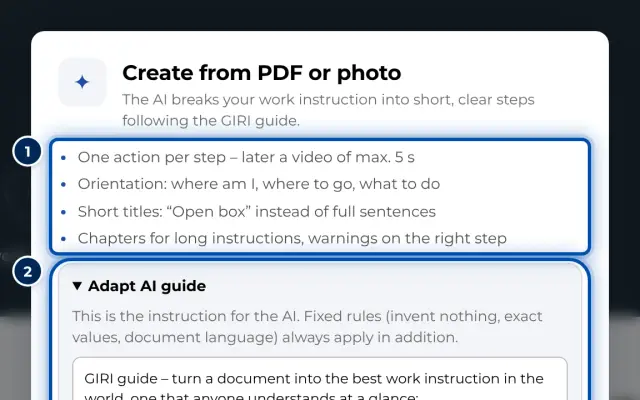
- When: only when someone chooses Create from PDF or photos or Create from PDF or photo and selects a file. GIRI never sends anything to the AI on its own.
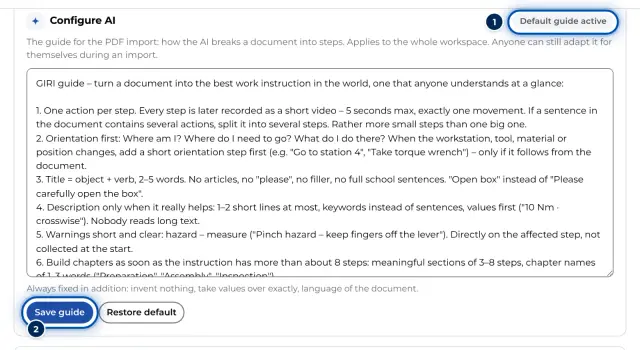
- What is transferred: the PDF, up to 12 MB, or 1 to 20 photos, which GIRI combines into a PDF in the browser. Added to this is the instruction to the AI with the AI guide.
- Where to: Gemini via Google Vertex AI in Frankfurt (region europe-west3). If the intended model is not available there, GIRI uses another Gemini model in the same region, never in a different one.
- What comes back: a proposal with title, steps, chapters, warnings and where the pictures are in the document. GIRI then cuts out the pictures in the browser. You check the proposal under Review proposal and decide what to take over.
- Who may use it: everyone with the edit right. The admin sets the guide for the workspace, see Configure AI. Anyone can adapt it for themselves during an import.
- Limit: at most 60 analyses per workspace in 24 hours.
- Log: GIRI records each analysis with the person, time and model, to keep usage within limits.
There is no switch that turns off the AI import for the workspace. The AI only works, however, when someone explicitly starts the import. How the import works is explained in Create from PDF or photos (AI).
Translations with DeepL
Translations are machine translations by DeepL. There is no translate button. A translation is created when someone chooses a language in the worker view, the preview or for the PDF, and GIRI saves it for next time.
- Only texts are transferred: title, chapters, step texts and warnings. Photos and videos do not go to DeepL.
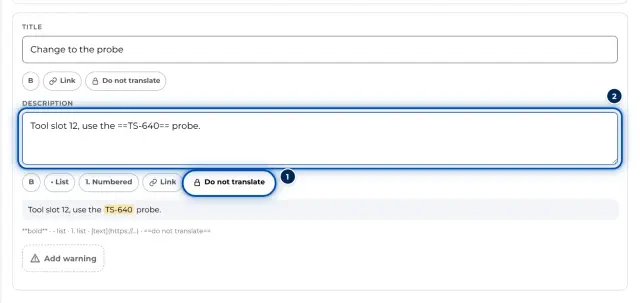
- GIRI does not translate text between two ==, such as part numbers. In the editor you set this with Do not translate.
- If someone chooses a language other than German or English for the app itself, DeepL translates the interface texts. No content from your workspace is sent along.
More in Instructions in other languages.
All other features
Recording, screen recording, symbols, checklists and analytics send no content to an AI model. All the service providers GIRI uses are listed in Where is my data?.