Overview
Information for the works council
What GIRI records about employees, who sees it, what can be set per instruction and which questions come up before you start.
The short answerGIRI records data that can be linked to individual employees: above all names, times and results in the job-done log and, if activated, training records. How you handle this in your company and whether your works council has a say is for your own experts to assess.
This page covers the data that can be linked to individual employees. The full list is in Personal data: what GIRI stores.
What GIRI records about employees
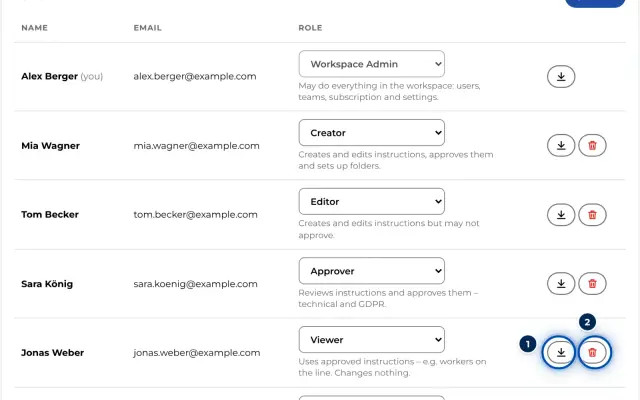
- Accounts: anyone who creates, reviews or reads instructions in the GIRI app has an account with name, e-mail address and role. With every change and approval of an instruction, GIRI stores who it was and when.
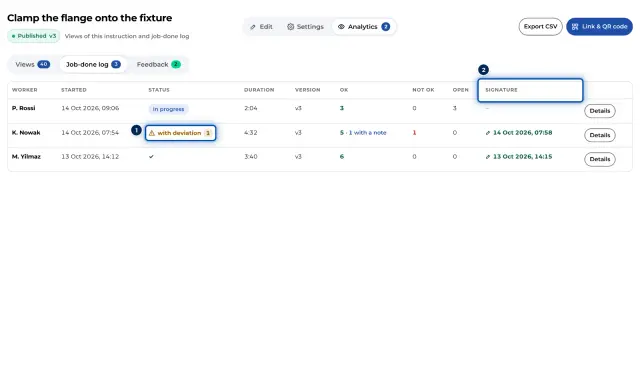
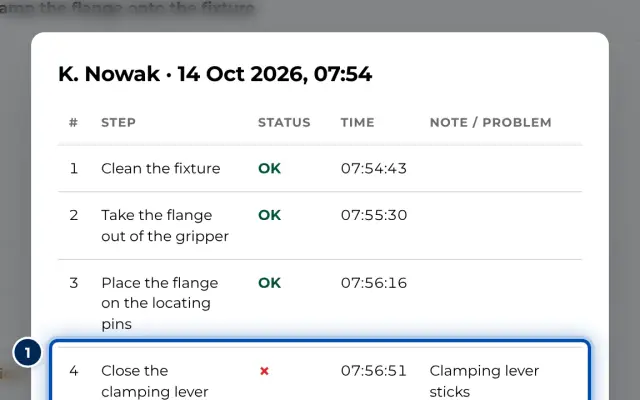
- Job-done log: only for instructions with a checklist. Before starting, the worker types in their name; the field is mandatory. GIRI stores start and end, the result of each step with the time, notes and photos for deviations and, if switched on, the signature. This makes it possible to link the duration and deviations of a run to a person.
- Views: without names. GIRI counts time, duration, steps seen and device type.
- Feedback: the name is optional.
- Training: only if GIRI activates it for you. GIRI then stores a list of people and, for each training confirmed, a record with signature.
- Technical: GIRI stores app starts, errors and slow page changes with user ID, device type and browser, and deletes them after 30 days.
- Customer care by GIRI: for each account, the e-mail address, name, date of the most recently created instruction and the number of views of the instructions the person created go to HubSpot, see Where is my data?.
Who sees it
- Training data is managed by admins. People with the workspace role Approver, Compliance Approver or Compliance Manager may read it, as may team admins for their department.
- Workers without an account see no logs of others.
What can be set
- Checklist per instruction: without Enable checklist there is no job-done log, only anonymous views.
- Signature per instruction: Finish with a signature can be switched on and off.
- Feedback per instruction: Allow worker feedback can be switched off. The name in feedback is always optional.
- What goes into the name field: the field is free text. You can agree on what goes in it, such as initials or a personnel number.
- Sign-in for training: Pick a name, or Number + PIN with a personal card, see Pick a name or number + PIN.
- Roles: the workspace admin decides who is admin and who has which role, see Roles and permissions.
Retention and deletion
GIRI does not delete job-done logs, views or feedback automatically. Instructions are not deleted permanently; after 30 days in the trash they are archived together with their logs. Admins erase people with an account themselves, and the names in logs are anonymised in the process, see GDPR data export and erasure. For the names of workers without an account and for deletion periods, write to giri@ar-giri.de.
To clarify before you start
Whether your works council has co-determination rights over GIRI and what an agreement should cover is for your own experts to assess, such as HR, your data protection officer or legal counsel. The information on this page helps with questions like these: What do you use job-done logs and training records for? Who gets an account with which role? What goes into the name field? When do you delete data? We are happy to answer technical questions: giri@ar-giri.de.