Overview
What is GIRI? Overview and key terms
GIRI in two minutes: what the app is for, who it is meant for and what the most important terms in the app mean.
GIRI is the app for digital work instructions with photos and video. You record a routine step by step on your phone, have it approved, and your team opens it with a QR code right at the workstation.
- 1RecordFilm or photograph each action with your phone.
- 2MarkArrows and symbols show what matters.
- 3ApproveChecked on the technical side and for data protection.
- 4ShareQR code on the machine, link to the team.
- 5WorkWorkers scan and follow it step by step, without signing in.
- 6ImproveFeedback from workers shows where things get stuck.
What GIRI is for
Paper goes out of date, and nobody rewinds a long video. A GIRI instruction is made of short steps: one photo or a few seconds of video per action, one sentence and, where it helps, an arrow on the picture. Whoever scans the QR code at the workstation always sees the latest approved version, in their own language if they like. Instead of putting together a document from text and photos, you record the routine directly. That saves a lot of time when documenting.
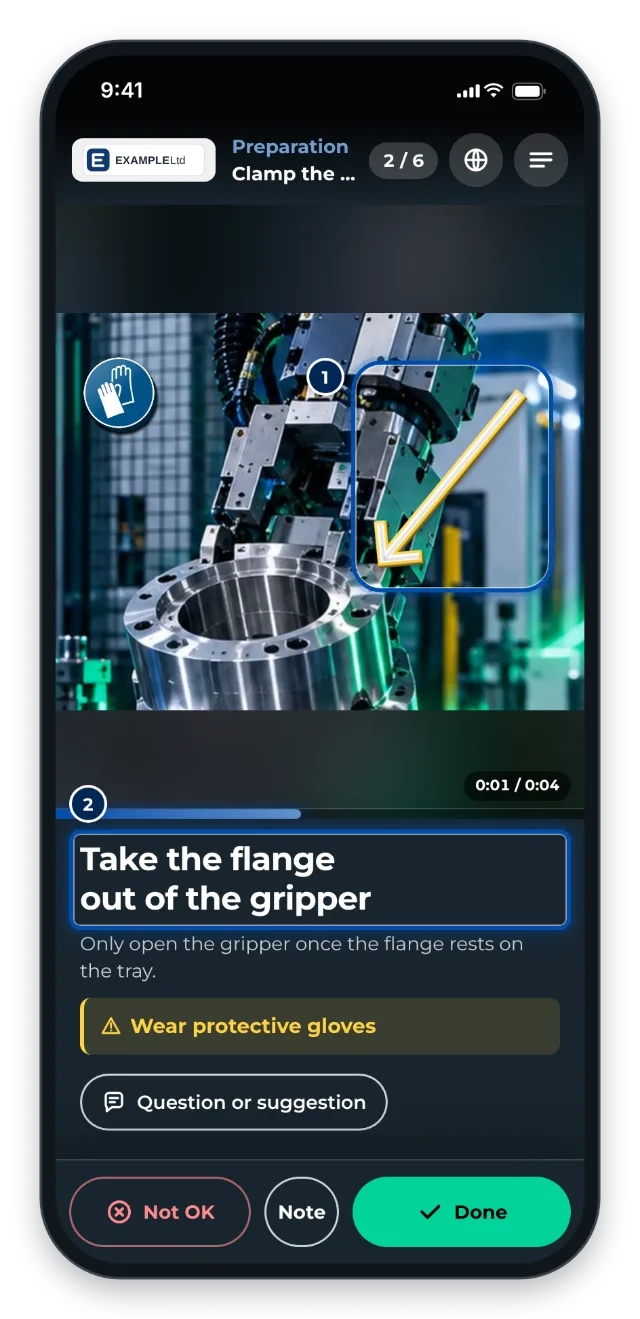
The essentials:
- GIRI is a web app at go.ar-giri.de. It runs in the browser on a PC, a phone and a tablet. You can install it like an app.
- Signing in needs no password: you use a code sent by email, or Google.
- Workers do not need an account. They open published instructions by link or QR code.
- Before workers see an instruction, it is approved: on the technical side and for data protection.
Who it is for
- People who document routines, such as supervisors, shift leads, maintenance, quality or production planning: they record instructions and keep them up to date.
- People who approve: they check that the routine is right and that no faces, names or number plates are visible.
- Workers: they follow the instruction at the workstation, confirm each step if required and send feedback.
- Workspace admins: they invite colleagues, assign roles and set up teams.
GIRI is in beta
Next to the GIRI logo it says BETA. Tap or click it and GIRI explains what that means: the app is developed continuously, with something new almost every week, and your instructions are kept throughout. GIRI loads new versions on its own. See How updates arrive.
Key terms
This is what things are called in the app:
- Instruction (also SOP or work instruction): describes one task step by step. Under Instructions you find every instruction you are allowed to see.
- Step: one action with a photo or short video, a title and, where needed, a description, a warning and markings on the picture.
- Chapter: structures longer instructions, for example into preparation, execution and wrap-up.
- Folder: organises instructions, for example by area or machine. A folder can be limited to certain teams.
- Teams: groups of people, for example Assembly. They control who sees which folders and instructions. Within a team, someone can have a different role than in the rest of the workspace.
- Workspace: your company’s area in GIRI, with all instructions, people, teams and settings.
- Roles & permissions: define who may do what, for example Creator, Editor, Approver or Viewer. People and roles are managed by the Workspace Admin. See Roles and permissions.
- Approval: an instruction moves from Draft to In review to Published. It needs two approvals for that, Technical approval and GDPR approval. Anyone with both rights publishes alone. See How approval works.
- Link & QR code: every published instruction has a link and a QR code. Both always show the latest approved version.
- Workers: the people who follow an instruction at the workstation, without signing in. In logs they appear as Worker.
- Checklist: when it is switched on, the worker confirms steps with Done or reports Not OK. At the end they can sign.
- Job-done log: shows who worked through an instruction and when, with status and signature. You find it under Analytics.
- Feedback: what workers report about an instruction. In the worker view the button is called Question or suggestion.
- Training: an instruction that certain people must demonstrably complete, for example a safety briefing. GIRI activates training per workspace; you then find it in the menu under Training.
- Training record: the evidence that a person has been trained, with date and signature.